Drink more water: a 2027 resolution and a water tracker app
Davka is an iPhone and Android app for logging supplements and vitamins by part of the day, plus water and caffeine, with widgets and PDF reports. Water has its own card on the Home screen with a daily goal, and one tap logs it.
This page describes what Davka does for a resolution to drink more water. It gives no advice on how much water to drink and does not judge how you are doing: it shows what you logged.
Daily goal and quick logging
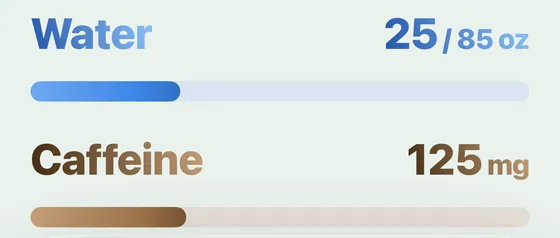
Below the supplements the Home screen has the Water and Caffeine cards. One tap on Water logs the preset amount; holding it changes the amount or the daily goal. The card shows how much of the goal is logged today.
Widget on the Home Screen
The water widget logs straight from the Home Screen, without opening the app.
Week and month
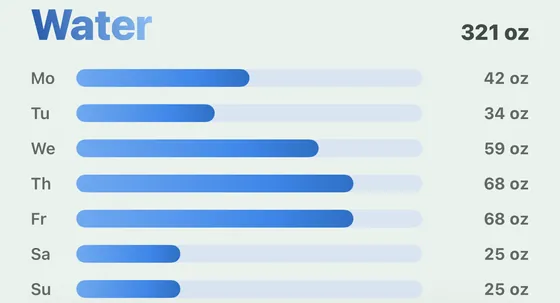
On the calendar tab you see the month in a calendar and below it the water for a week, day by day, with the average per day. A PDF report for a month, a quarter or a year and the full history as CSV are exported from Settings.
Apple Health
With your permission, Davka on iPhone writes the logged water, caffeine and nutrients to the Health app. You turn the connection on in Settings, in the Apple Health row.
Where Davka is weaker
Today it cannot share records with other people. It gives no advice on how much water to drink.
Water in Davka
| What | How you log it | What you see |
|---|---|---|
| Water during the day | one tap on the Water card on the Home screen | how much of the daily goal is logged today |
| Another amount or goal | hold the Water card | the changed amount and the adjusted daily goal |
| Logging from the Home Screen | the water widget | logging without opening the app |
| A week | the calendar tab | water for a week, day by day, and the average per day |
| Apple Health | permission in Settings | water also in the Health app |
FAQ
How do I set a daily water goal in Davka?
On the Home screen, hold the Water card to change the preset amount and the daily goal. Davka does not advise what goal to choose.
Can I log water without opening the app?
Yes. The water widget on the Home Screen logs straight from it.
Does Davka write water to Apple Health?
With your permission, yes. You turn the connection on in Settings, in the Apple Health row; on iPhone Davka writes logged nutrients, water and caffeine to the Health app.
How much does Davka cost?
The first 7 days are free, with no payment up front and no card details. After that you choose a subscription ($1.99 a month or $19.99 a year) or a lifetime license ($39.99, paid once). A subscription is not required: the lifetime license is one single payment.
Does Davka need an account?
No. Davka asks for no registration or sign-in and has no ads or analytics.
What happens when the trial ends?
Your records are not deleted after the trial. The app stays locked until you choose a subscription or the lifetime license, and you can download your records as CSV right from that screen.
More resolutions
New year resolutions 2027 with a log · Supplements and vitamins · Less caffeine · Drink less: Dry January
Davka is on the App Store and Google Play